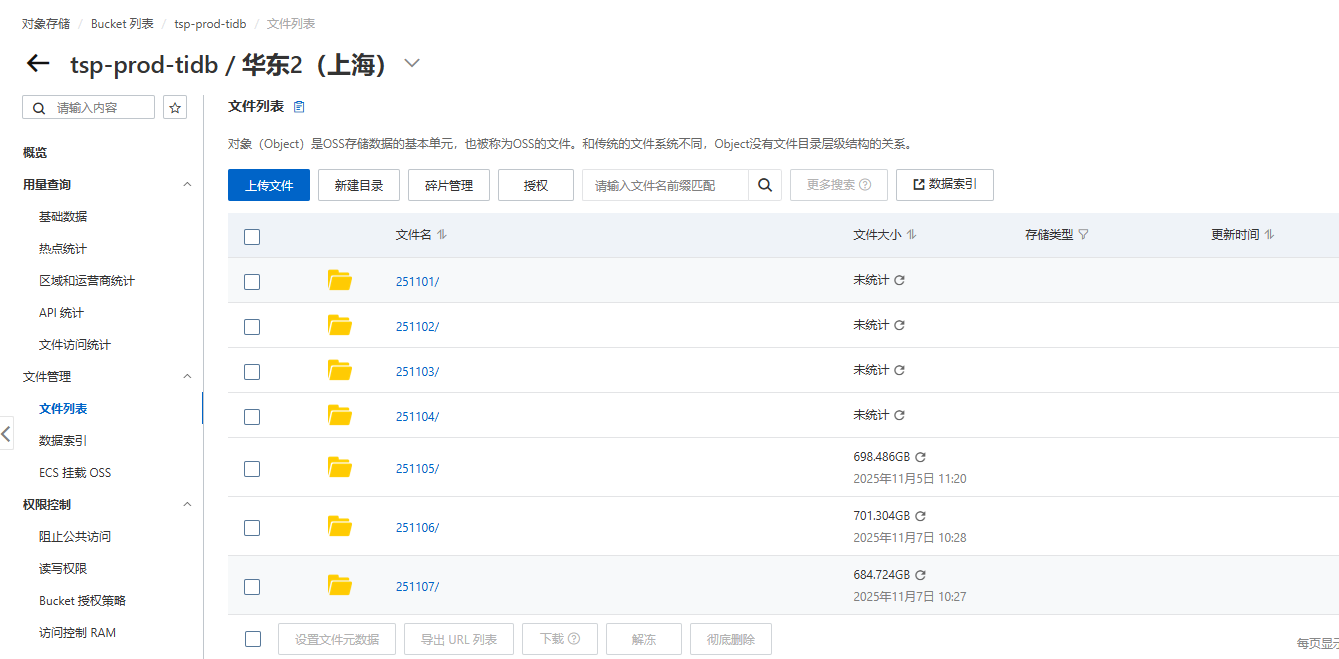
【 TiDB 使用环境】生产环境
【 TiDB 版本】V7.5.0
【复现路径】BR V7.5.7 版本执行日志备份任务
【遇到的问题:问题现象及影响】Detail BR log in brbackuplog-20251106091851.log
[2025/11/06 09:22:19.961 +08:00] [INFO] [collector.go:77] [“log start failed summary”] [total-ranges=1] [ranges-succeed=0] [ranges-failed=1] [unit-name=“log start”] [error=“RequestError: send request failed\ncaused by: Head "https://csi-tidb-backup.oss-cn-shanghai.aliyuncs.com/backup-data/log-backup/backup.lock\”: read tcp 10.207.38.40:38904->106.14.228.174:443: read: connection reset by peer"] [errorVerbose=“RequestError: send request failed\ncaused by: Head "https://csi-tidb-backup.oss-cn-shanghai.aliyuncs.com/backup-data/log-backup/backup.lock\”: read tcp 10.207.38.40:38904->106.14.228.174:443: read: connection reset by peer\ngithub.com/pingcap/errors.Trace\n\t/root/go/pkg/mod/github.com/pingcap/errors@v0.11.5-0.20241219054535-6b8c588c3122/juju_adaptor.go:15\ngithub.com/pingcap/tidb/br/pkg/storage.(*S3Storage).FileExists\n\t/workspace/source/tidb/br/pkg/storage/s3.go:676\ngithub.com/pingcap/tidb/br/pkg/task.(*streamMgr).checkLock\n\t/workspace/source/tidb/br/pkg/task/stream.go:350\ngithub.com/pingcap/tidb/br/pkg/task.RunStreamStart\n\t/workspace/source/tidb/br/pkg/task/stream.go:590\ngithub.com/pingcap/tidb/br/pkg/task.RunStreamCommand\n\t/workspace/source/tidb/br/pkg/task/stream.go:531\nmain.streamCommand\n\t/workspace/source/tidb/br/cmd/br/stream.go:232\nmain.newStreamStartCommand.func1\n\t/workspace/source/tidb/br/cmd/br/stream.go:70\ngithub.com/spf13/cobra.(*Command).execute\n\t/root/go/pkg/mod/github.com/spf13/cobra@v1.7.0/command.go:940\ngithub.com/spf13/cobra.(*Command).ExecuteC\n\t/root/go/pkg/mod/github.com/spf13/cobra@v1.7.0/command.go:1068\ngithub.com/spf13/cobra.(*Command).Execute\n\t/root/go/pkg/mod/github.com/spf13/cobra@v1.7.0/command.go:992\nmain.main\n\t/workspace/source/tidb/br/cmd/br/main.go:36\nruntime.main\n\t/usr/local/go/src/runtime/proc.go:267\nruntime.goexit\n\t/usr/local/go/src/runtime/asm_amd64.s:1650"]
Error: RequestError: send request failed
caused by: Head “https://csi-tidb-backup.oss-cn-shanghai.aliyuncs.com/backup-data/log-backup/backup.lock”: read tcp 10.207.38.40:38904->106.14.228.174:443: read: connection reset by peer
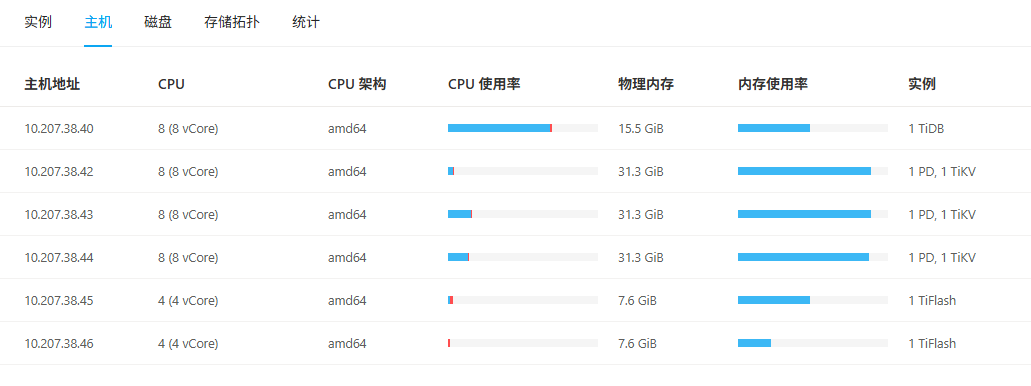
【资源配置】进入到 TiDB Dashboard -集群信息 (Cluster Info) -主机(Hosts) 截图此页面
【附件:截图/日志/监控】日志报错如下:
2025/11/06 09:18:52.237 +08:00] [INFO] [s3.go:425] [“succeed to get bucket region from s3”] [“bucket region”=]
[2025/11/06 09:18:52.268 +08:00] [INFO] [common.go:180] [“trying to connect to etcd”] [addr=“[10.207.38.42:2379]”]
[2025/11/06 09:18:52.476 +08:00] [WARN] [s3.go:1176] [“failed to request s3, retrying”] [error=“RequestError: send request failed\ncaused by: Head "https://csi-tidb-backup.oss-cn-shanghai.aliyuncs.com/backup-data/log-backup/backup.lock\”: read tcp 10.207.38.40:38882->106.14.228.174:443: read: connection reset by peer"] [backoff=1.292076205s]
[2025/11/06 09:18:53.788 +08:00] [WARN] [s3.go:1176] [“failed to request s3, retrying”] [error=“RequestError: send request failed\ncaused by: Head "https://csi-tidb-backup.oss-cn-shanghai.aliyuncs.com/backup-data/log-backup/backup.lock\”: read tcp 10.207.38.40:38884->106.14.228.174:443: read: connection reset by peer"] [backoff=3.639634402s]
[2025/11/06 09:18:54.236 +08:00] [INFO] [pd.go:430] [“adaptive update ts interval state transition”] [configuredInterval=2s] [prevAdaptiveUpdateInterval=2s] [newAdaptiveUpdateInterval=2s] [requiredStaleness=0s] [prevState=unknown(0)] [newState=normal]
[2025/11/06 09:18:57.448 +08:00] [WARN] [s3.go:1176] [“failed to request s3, retrying”] [error=“RequestError: send request failed\ncaused by: Head "https://csi-tidb-backup.oss-cn-shanghai.aliyuncs.com/backup-data/log-backup/backup.lock\”: read tcp 10.207.38.40:38886->106.14.228.174:443: read: connection reset by peer"] [backoff=6.854112628s]
[2025/11/06 09:19:04.322 +08:00] [WARN] [s3.go:1176] [“failed to request s3, retrying”] [error=“RequestError: send request failed\ncaused by: Head "https://csi-tidb-backup.oss-cn-shanghai.aliyuncs.com/backup-data/log-backup/backup.lock\”: read tcp 10.207.38.40:38888->106.14.228.174:443: read: connection reset by peer"] [backoff=11.53871172s]
[2025/11/06 09:19:15.880 +08:00] [WARN] [s3.go:1176] [“failed to request s3, retrying”] [error=“RequestError: send request failed\ncaused by: Head "https://csi-tidb-backup.oss-cn-shanghai.aliyuncs.com/backup-data/log-backup/backup.lock\”: read tcp 10.207.38.40:38890->106.14.228.174:443: read: connection reset by peer"] [backoff=26.958831968s]
[2025/11/06 09:19:42.860 +08:00] [WARN] [s3.go:1176] [“failed to request s3, retrying”] [error=“RequestError: send request failed\ncaused by: Head "https://csi-tidb-backup.oss-cn-shanghai.aliyuncs.com/backup-data/log-backup/backup.lock\”: read tcp 10.207.38.40:38900->106.14.228.174:443: read: connection reset by peer"] [backoff=54.558994944s]
[2025/11/06 09:20:37.441 +08:00] [WARN] [s3.go:1176] [“failed to request s3, retrying”] [error=“RequestError: send request failed\ncaused by: Head "https://csi-tidb-backup.oss-cn-shanghai.aliyuncs.com/backup-data/log-backup/backup.lock\”: read tcp 10.207.38.40:38902->106.14.228.174:443: read: connection reset by peer"] [backoff=1m42.46164352s]
[2025/11/06 09:22:19.959 +08:00] [INFO] [pd_service_discovery.go:249] [“[pd] exit member loop due to context canceled”]
。。。
。。。
。。。
[2025/11/06 09:22:19.960 +08:00] [INFO] [pd_service_discovery.go:295] [“[pd] close pd service discovery client”]
[2025/11/06 09:22:19.961 +08:00] [ERROR] [stream.go:532] [“failed to stream”] [command=“log start”] [error=“RequestError: send request failed\ncaused by: Head "https://csi-tidb-backup.oss-cn-shanghai.aliyuncs.com/backup-data/log-backup/backup.lock\”: read tcp 10.207.38.40:38904->106.14.228.174:443: read: connection reset by peer"] [errorVerbose=“RequestError: send request failed\ncaused by: Head "https://csi-tidb-backup.oss-cn-shanghai.aliyuncs.com/backup-data/log-backup/backup.lock\”: read tcp 10.207.38.40:38904->106.14.228.174:443: read: connection reset by peer\ngithub.com/pingcap/errors.Trace\n\t/root/go/pkg/mod/github.com/pingcap/errors@v0.11.5-0.20241219054535-6b8c588c3122/juju_adaptor.go:15\ngithub.com/pingcap/tidb/br/pkg/storage.(*S3Storage).FileExists\n\t/workspace/source/tidb/br/pkg/storage/s3.go:676\ngithub.com/pingcap/tidb/br/pkg/task.(*streamMgr).checkLock\n\t/workspace/source/tidb/br/pkg/task/stream.go:350\ngithub.com/pingcap/tidb/br/pkg/task.RunStreamStart\n\t/workspace/source/tidb/br/pkg/task/stream.go:590\ngithub.com/pingcap/tidb/br/pkg/task.RunStreamCommand\n\t/workspace/source/tidb/br/pkg/task/stream.go:531\nmain.streamCommand\n\t/workspace/source/tidb/br/cmd/br/stream.go:232\nmain.newStreamStartCommand.func1\n\t/workspace/source/tidb/br/cmd/br/stream.go:70\ngithub.com/spf13/cobra.(*Command).execute\n\t/root/go/pkg/mod/github.com/spf13/cobra@v1.7.0/command.go:940\ngithub.com/spf13/cobra.(*Command).ExecuteC\n\t/root/go/pkg/mod/github.com/spf13/cobra@v1.7.0/command.go:1068\ngithub.com/spf13/cobra.(*Command).Execute\n\t/root/go/pkg/mod/github.com/spf13/cobra@v1.7.0/command.go:992\nmain.main\n\t/workspace/source/tidb/br/cmd/br/main.go:36\nruntime.main\n\t/usr/local/go/src/runtime/proc.go:267\nruntime.goexit\n\t/usr/local/go/src/runtime/asm_amd64.s:1650"] [stack=“github.com/pingcap/tidb/br/pkg/task.RunStreamCommand\n\t/workspace/source/tidb/br/pkg/task/stream.go:532\nmain.streamCommand\n\t/workspace/source/tidb/br/cmd/br/stream.go:232\nmain.newStreamStartCommand.func1\n\t/workspace/source/tidb/br/cmd/br/stream.go:70\ngithub.com/spf13/cobra.(*Command).execute\n\t/root/go/pkg/mod/github.com/spf13/cobra@v1.7.0/command.go:940\ngithub.com/spf13/cobra.(*Command).ExecuteC\n\t/root/go/pkg/mod/github.com/spf13/cobra@v1.7.0/command.go:1068\ngithub.com/spf13/cobra.(*Command).Execute\n\t/root/go/pkg/mod/github.com/spf13/cobra@v1.7.0/command.go:992\nmain.main\n\t/workspace/source/tidb/br/cmd/br/main.go:36\nruntime.main\n\t/usr/local/go/src/runtime/proc.go:267”]
TiDB 集群运行在本地VMware虚拟化中,想备份到阿里云OSS存储,网络已经打通:
[root@tidb ~]# telnet 106.14.228.174 443
Trying 106.14.228.174...
Connected to 106.14.228.174.
Escape character is '^]'.
目前不知道问题出在哪,有没有大手子遇到过?